Introduction
Most people spend plenty of time picking ideal switches, stylish keycaps and stunning RGB backlights when shopping for a mechanical keyboard. However, they often overlook the most critical factor: the keyboard’s structure, the core hidden element that defines your daily typing feel and acoustic performance.
Even two mechanical keyboards equipped with identical switches and keycaps can deliver totally different typing experiences, ranging from firm crisp taps to soft bouncy keystrokes. Learning about mainstream keyboard structures allows you to pick a matching mechanical keyboard and extend its service lifespan.
Table of Contents
- What is the keyboard structure
and why it matters? - Tray structure
- Top structure
- Gasket structure
- Recommended Mechanical Keyboards
What is the keyboard structure and why it is important?
Simply put, a keyboard’s structure refers to the assembly and cushioning method of plate, PCB and outer case components. It directly determines how firm or soft your typing feels and shapes the overall typing sound.
Your entire typing experience mainly relies on its internal structure.
Office typists gain much better comfort with a suitable keyboard structure; mismatched construction easily causes wrist soreness after hours of continuous input. Mastering different structures helps you select a high-quality mechanical keyboard and boost long-term work productivity.
For competitive gamers, keyboard structure impacts key response speed and consistent tactile feedback — a decisive advantage during intense gaming sessions. Smooth, rapid keystroke feedback grants FPS players better control in fast-paced battles.
Keyboard hobbyists can fully customize their custom builds once they understand various keyboard structures, crafting personalized mechanical keyboards with exclusive appearance, tactile feel and typing sound.
Tray Structure
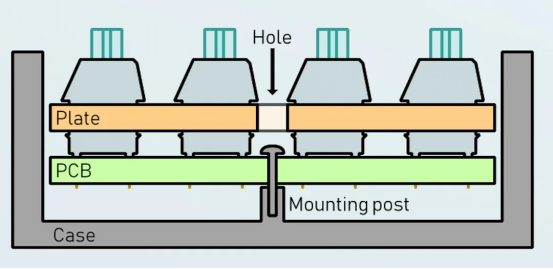
Tray structure is one of the most straightforward mechanical keyboard structures. It assembles bottom case, PCB and positioning plate together via fixed screws. Low manufacturing cost and simple assembly make it perfect for new DIY enthusiasts to practice custom keyboard building. Most beginners learn basic keyboard assembly techniques through tray structure boards.
Tray structure abandons an independent upper shell, using the bottom case as the full outer frame. While this delivers a streamlined keyboard silhouette, the PCB sits directly against the base shell. Every keystroke triggers obvious shell vibration, creating hollow cavity noise and unwanted rattle. Thin lightweight bottom housings will amplify vibrations and ruin consistent typing tactility.
Source from AKKO
Top Structure
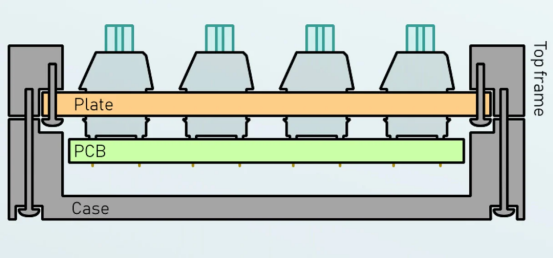
Top structure fixes the positioning plate onto the upper shell, with screws locking top and bottom housings to complete assembly. The tightly secured plate delivers sharp bottom-out travel and crisp responsive keystroke feedback. Vibrations distribute evenly across the entire board, generating consistent clean typing acoustics. This design fits competitive gamers who perform frequent fast spamming and heavy high-intensity keystrokes.
Its primary drawbacks include rigid stiff tactility that causes hand fatigue after prolonged use. Additionally, metal mounting screws transmit vibration straight to the case shell, triggering resonance and extra rattling noise.
Source from AKKO
Gasket Structure
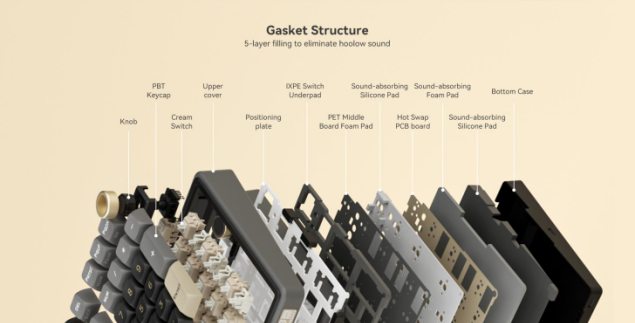
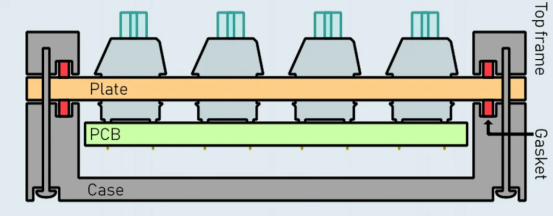
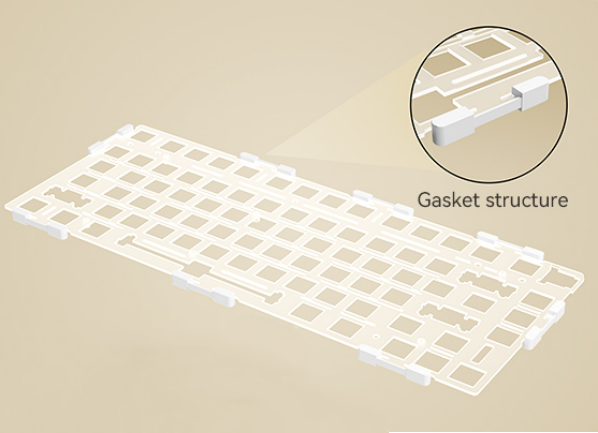
Gasket structure suspends the positioning plate between upper and bottom shells with soft silicone or Poron padding wrapped around the plate edge, without rigid locking screws for internal components. Closing the top and bottom housings compresses the surrounding gaskets, and this clamping force firmly stabilizes all internal keyboard parts.
These elastic soft gaskets provide gentle cushioning for every single keystroke, creating silky springy tactility ideal for office workers typing nonstop throughout the day. The shock-absorbing padding absorbs most vibration generated during typing, eliminating wire ping and rattles to deliver clean, premium typing sound.
Nevertheless, precise case molds and high-performance gasket materials raise production costs, so mechanical keyboards adopting gasket structure generally come with a higher price tag. Moreover, users who prefer firm sharp keystrokes may dislike its muted soft feel, as part of tapping force gets absorbed by the cushion layers.
Source from AKKO
Recommended Mechanical Keyboards
1. RK ROYAL KLUDGE S98
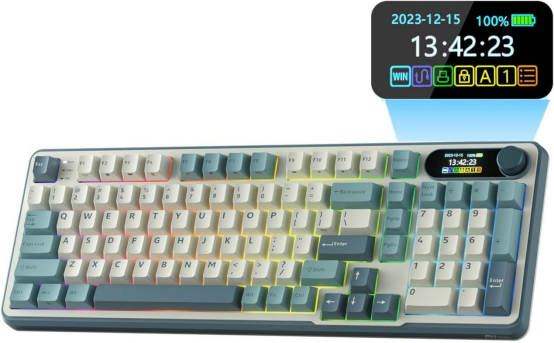
Built with Top-structure design, the positioning plate locks tightly onto the upper shell. This solid integrated construction delivers balanced uniform keystroke feedback and crisp tapping tactility, perfectly suited for high-intensity competitive gaming. Continuous rapid keystrokes produce zero hollow resonance, maintaining consistent reliable tactile performance and reducing misoperations during fierce in-game fights.
2. RK ROYAL KLUDGE R98 Pro
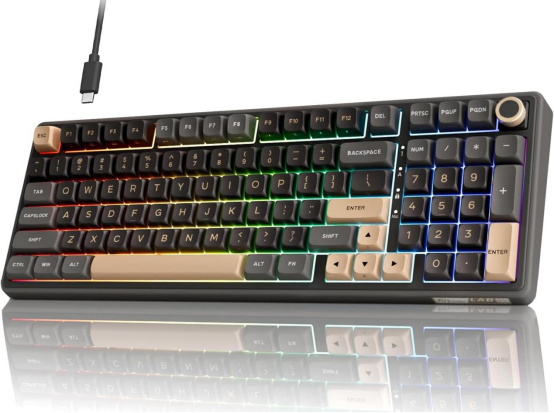
This mechanical keyboard equips five layers of internal sound-absorbing padding to suppress vibration and hollow cavity noise for cleaner, purer typing sound. Its Gasket-structure positioning plate delivers outstanding cushioning and shock absorption. The soft bouncy tactile feel keeps hands relaxed and comfortable even after hours of office typing or gaming input.
Conclusion
Keyboard structure style determines the core typing tactility of every mechanical keyboard. Tray structure boards are cost-efficient and easy to assemble, an ideal starting point for DIY keyboard beginners despite noticeable rattling and inconsistent keystroke feedback. Top structure generates crisp precise taps paired with stable typing acoustics, catering to competitive gamers who rely on continuous fast heavy inputs. Gasket structure mechanical keyboards offer silky bouncy typing experience and premium noise reduction, a top pick for long-hour daily typists, though this advanced structure comes with a higher overall cost.
Learning the unique pros and cons of these three mainstream keyboard structures allows shoppers to pick a mechanical keyboard matching their daily usage scenarios and budget range. Once you fully understand the performance gaps between these popular keyboard constructions, finding a perfect keyboard fitting your regular demands becomes far less complicated.