Keyboard switch types and gaming control
What Are Hall Effect Keyboard Switches? A Beginner’s Guide
How magnetic sensing, adjustable actuation, and Rapid Trigger work—plus RK68 HE and C68 product examples.
Magnetic
Key detection
3
Sensing steps
2
Core controls
2
RK product examples
On this page
Keyboard switches come in many different designs, but most conventional mechanical switches register a keypress through physical electrical contacts. Hall effect keyboard switches take a different approach: they use magnets and sensors to detect key movement.
This allows compatible keyboards to offer features such as adjustable actuation, Rapid Trigger, and, in some cases, analog input. These capabilities have made magnetic keyboard switches especially popular among gamers. However, a Hall effect keyboard is not automatically better for every user.
This guide explains how Hall effect switches work, how they differ from conventional mechanical switches, and what to consider before choosing one.
What Are Hall Effect Keyboard Switches?
Hall effect keyboard switches are often called magnetic keyboard switches because they use a magnet as part of the key-detection system. The switch still has familiar mechanical components, including a stem, spring, and housing. The main difference is how the keyboard detects movement.
In a typical Hall effect design, a magnet moves with the switch stem, while a sensor on the keyboard’s PCB detects changes in the magnetic field. This allows the keyboard to interpret key position without relying on conventional metal-contact actuation.
The switch itself is therefore only part of the system. The sensor, PCB, firmware, calibration, and configuration software all influence how the keyboard performs.
How Do Hall Effect Keyboard Switches Work?
The basic process can be understood in three steps:
-
You press the key.
The switch stem moves downward, and the magnet inside or attached to the stem moves with it. -
The sensor detects a magnetic change.
A Hall effect sensor beneath the switch measures changes in the magnetic field as the magnet moves closer or farther away. -
The keyboard interprets the movement.
Its firmware converts the sensor readings into key-position information and determines when the key should activate, reset, or perform another supported action.
Because this sensing method does not require two metal contacts to close a circuit, keystrokes can be registered contactlessly.
Contactless sensing does not mean the switch has no moving parts or will never wear out. The stem, spring, housing, and other physical components still matter to its feel and durability.
Hall Effect Switches vs. Mechanical Switches
The term “mechanical switch” is often used to describe conventional contact-based designs. Here is how they generally differ from Hall effect switches:
| Feature | Conventional mechanical switches | Hall effect switches |
|---|---|---|
| Key detection | Physical electrical contacts | Magnetic sensing |
| Actuation point | Usually fixed by switch design | Adjustable on supported keyboards |
| Reset behavior | Usually determined by a fixed reset point | Can be dynamically adjusted with supported features |
| Analog input | Generally not available | Available on some compatible models |
| Software dependence | Usually optional for basic use | Often important for advanced settings |
| Switch compatibility | Broad MX-style ecosystem, depending on the PCB | Must match the keyboard’s magnetic sensing design |
| Common uses | Typing, gaming, customization | Adjustable gaming control, rapid repeated inputs, everyday typing |
A conventional mechanical keyboard may still be the better choice if you prefer a simple fixed actuation point, a wide selection of tactile or clicky switches, or broad aftermarket compatibility.
What Is Adjustable Actuation?
Adjustable actuation lets you choose how far a key needs to travel before the keyboard registers a press.
On a conventional mechanical switch, this point is largely determined by the switch’s physical design. On a compatible Hall effect keyboard, software can change the activation threshold.
For example, you might prefer:
-
A shallower setting for keys used in fast gaming actions;
-
A deeper setting for keys you want to avoid pressing accidentally;
-
Different settings for individual keys, if the keyboard supports per-key adjustment.
A lower actuation setting is not always better. Extremely sensitive keys may activate when you rest your fingers on them or make an unintended movement. The most useful setting is one that balances responsiveness with control.
What Is Rapid Trigger?
Rapid Trigger focuses on when a key resets and becomes ready for another input.
With a conventional mechanical switch, the key normally needs to return beyond a fixed reset point before it can activate again. With Rapid Trigger, compatible keyboards can reset the key after a smaller upward movement. Some implementations can dynamically activate and reset the key as its direction changes, reducing the travel required between repeated inputs.
This can be useful for actions that involve frequent pressing and releasing, such as movement changes and counter-strafing.
The simplest way to distinguish the two features is:
-
Adjustable actuation: Controls when the key activates on the way down.
-
Rapid Trigger: Controls how the key resets and can activate again.
They are related, but they are not the same feature.
Do Hall Effect Keyboards Support Analog Input?
Some Hall effect keyboards can provide analog input, meaning they can interpret different keypress depths rather than treating every key as simply on or off.
Depending on the keyboard, software, and application, this may enable features such as variable movement control or different actions at different press depths. However, analog behavior is not universally supported by every game or program.
Advanced features such as dual-stage actuation and SOCD handling may also be available on some models. These are keyboard and firmware features—not capabilities automatically provided by every magnetic switch.
Are Hall Effect Switches Better for Gaming?
They can be useful for gamers who specifically want adjustable actuation or Rapid Trigger. Reducing the physical travel required for activation or repeated inputs can make supported actions feel more immediate.
However, actuation distance and overall keyboard latency are not the same thing. Performance also depends on sensor implementation, firmware, scanning, signal processing, connection mode, and communication with the computer.
Likewise, a high polling rate describes only one part of the input system. A Hall effect keyboard should not be judged solely by the smallest actuation number or the highest polling-rate figure on its specification sheet.
The technology can provide more control, but it does not automatically improve aiming, reaction time, or game performance for every player.
Are Hall Effect Switches Good for Typing?
Hall effect switches can work well for everyday typing, but the experience depends on the complete keyboard.
Switch weight, spring design, lubrication, stabilizers, keycaps, mounting structure, and dampening materials all affect typing feel and sound. Many magnetic switches have a linear feel, which may suit users who prefer smooth travel without a tactile bump or click.
If you enjoy tactile or clicky switches, a conventional mechanical keyboard may offer more choices. Adjustable actuation can also take some experimentation: a setting that feels responsive in a game may feel too sensitive during long typing sessions.
Can You Put Magnetic Switches in Any Hot-Swappable Keyboard?
No. Hot-swap support does not guarantee Hall effect switch compatibility.
A conventional hot-swappable mechanical PCB is generally designed for electrical-contact switches. A Hall effect keyboard needs appropriate magnetic sensors, PCB support, firmware, and calibration.
Even among Hall effect keyboards, compatible switches can vary. Magnet position, strength, stem design, travel range, and sensor calibration may affect operation. Always check the keyboard manufacturer’s compatibility list before replacing switches.
RK Hall Effect Keyboard Examples: RK68 HE and C68
RK offers several Hall effect keyboards that apply magnetic sensing and adjustable controls to compact gaming setups. Two examples are the RK68 HE and C68. Although both use Hall effect technology, their exact layouts, features, and software options should be considered separately.
RK68 HE: A Compact Wired Hall Effect Keyboard
The RK68 HE is a wired Hall effect keyboard designed for users who want magnetic-switch control in a compact gaming setup. Its smaller footprint leaves more room beside the keyboard for mouse movement, which may be useful in FPS games and space-conscious desk setups.
RK’s Download Center lists the USB RGB version with web-based driver support. Users should select the exact product and version when configuring the keyboard rather than assuming that every RK web driver supports it.
The RK68 HE is therefore a practical example of what to look for in an entry point to Hall effect keyboards: a compact layout, wired connectivity, RGB lighting, and software access for supported settings. Before purchasing, users should confirm the current version’s actuation options, Rapid Trigger support, and magnetic-switch compatibility.
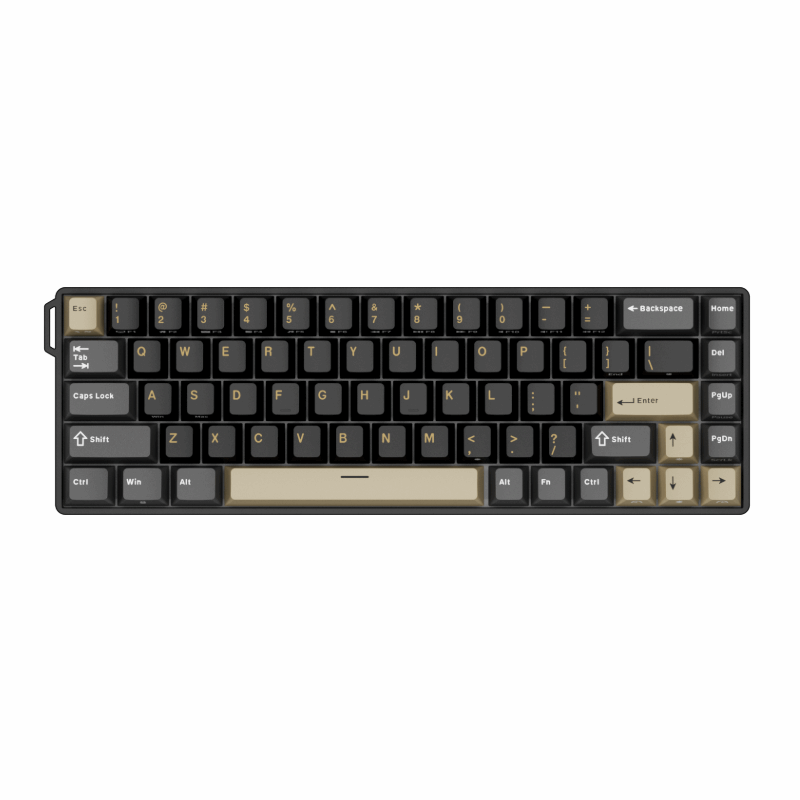
RK C68: Adjustable Control in a 68-Key Layout
The RK C68 is another compact Hall effect option, built around a 68-key layout. RK’s product information lists adjustable actuation, Rapid Trigger, 8000Hz polling, PBT keycaps, and web-based customization.
Adjustable actuation allows users to explore different activation depths, while Rapid Trigger is intended for actions that benefit from faster key resets. These features may appeal to FPS players who frequently change movement directions or repeatedly press and release the same keys.
The C68’s wired USB connection and web-based software keep its focus on a straightforward gaming setup. Its 8000Hz polling rate is another relevant specification, although polling rate alone does not determine total keyboard or system latency.

Choosing Between RK Hall Effect Models
The model name alone does not tell you which keyboard is more suitable. Start with the layout and the features you expect to use, then confirm the exact product version, software support, and compatible replacement switches.
For users who mainly want a compact wired Hall effect keyboard, the RK68 HE provides one option to investigate. For those specifically looking for a 68-key model with adjustable actuation, Rapid Trigger, and 8000Hz polling, the C68 presents a more explicitly gaming-oriented feature set.
Who Should Choose a Hall Effect Keyboard?
A Hall effect keyboard may be a good fit if you:
-
Want adjustable actuation on supported keys;
-
Expect to use Rapid Trigger regularly;
-
Want analog or depth-based functions supported by your software;
-
Enjoy customizing how your keyboard responds;
-
Prefer the feel of the magnetic switches offered with the keyboard.
A conventional mechanical keyboard may be more suitable if you:
-
Prefer fixed and predictable actuation;
-
Want broader tactile or clicky switch options;
-
Do not want to configure software;
-
Prioritize aftermarket switch compatibility over advanced input features.
What Should You Check Before Buying?
Start with the features you will actually use. Confirm whether the keyboard supports adjustable actuation, Rapid Trigger, per-key settings, or analog input rather than assuming every Hall effect model includes them all.
Next, examine the software. It should make important settings understandable and allow you to save or recover a comfortable configuration.
Finally, consider the complete keyboard: layout, switch feel, stabilizers, connectivity, keycaps, build quality, and switch compatibility. These details affect daily use just as much as the sensing technology.
Frequently Asked Questions
Are Hall effect switches better than mechanical switches?
Not for every user. Hall effect keyboards offer adjustable control on supported models, while conventional mechanical keyboards often provide broader tactile, clicky, and aftermarket switch options.
Can Hall effect switches fit any hot-swappable keyboard?
No. The keyboard needs compatible magnetic sensors, PCB support, firmware, and calibration. Always check the manufacturer’s compatibility information.
Is the lowest actuation setting always best?
No. A very shallow setting can make unintended presses more likely. Choose a setting that balances responsiveness with reliable control.
Does every Hall effect keyboard include Rapid Trigger and analog input?
No. Available features depend on the keyboard, firmware, software, and application. Confirm the exact product specifications before buying.
Conclusion
Hall effect keyboard switches use magnets and sensors to detect key movement, enabling compatible keyboards to offer adjustable actuation, Rapid Trigger, and other advanced functions. Their main advantage is not simply that they are magnetic—it is that they give the keyboard more information about how a key moves.
For gamers who want greater control over activation and reset behavior, that can be genuinely useful. For typing and general use, the decision should still come down to switch feel, software quality, compatibility, and the keyboard’s overall design.
The best choice is not the model with the most impressive individual number. It is the one whose features work reliably and match the way you actually use your keyboard.